The AWS Infrastructure Decision Most CTOs Make Too Late
The Hidden Risk of Running Everything on One Server
Most platforms start on a single server. It is the obvious choice at launch: low cost, fast to deploy, easy to manage. For a reservation and loyalty platform serving a growing hospitality group, a single EC2 instance running PostgreSQL directly on-box cost roughly $85 per month and worked exactly as intended. Until peak season arrived, bookings spiked, and the team understood that one server handling everything was not a production-grade AWS architecture. It was a risk that had simply not yet materialised.
That is the inflection point most CTOs, VPs of Engineering, and heads of infrastructure eventually reach: not whether to upgrade AWS infrastructure, but when. The gap between a basic setup and a production-ready platform is not about features. It is about risk tolerance, business continuity, and the confidence your team has when pushing a new release on a Tuesday afternoon without a maintenance window.
What a Single-Server AWS Setup Actually Looks Like in Production
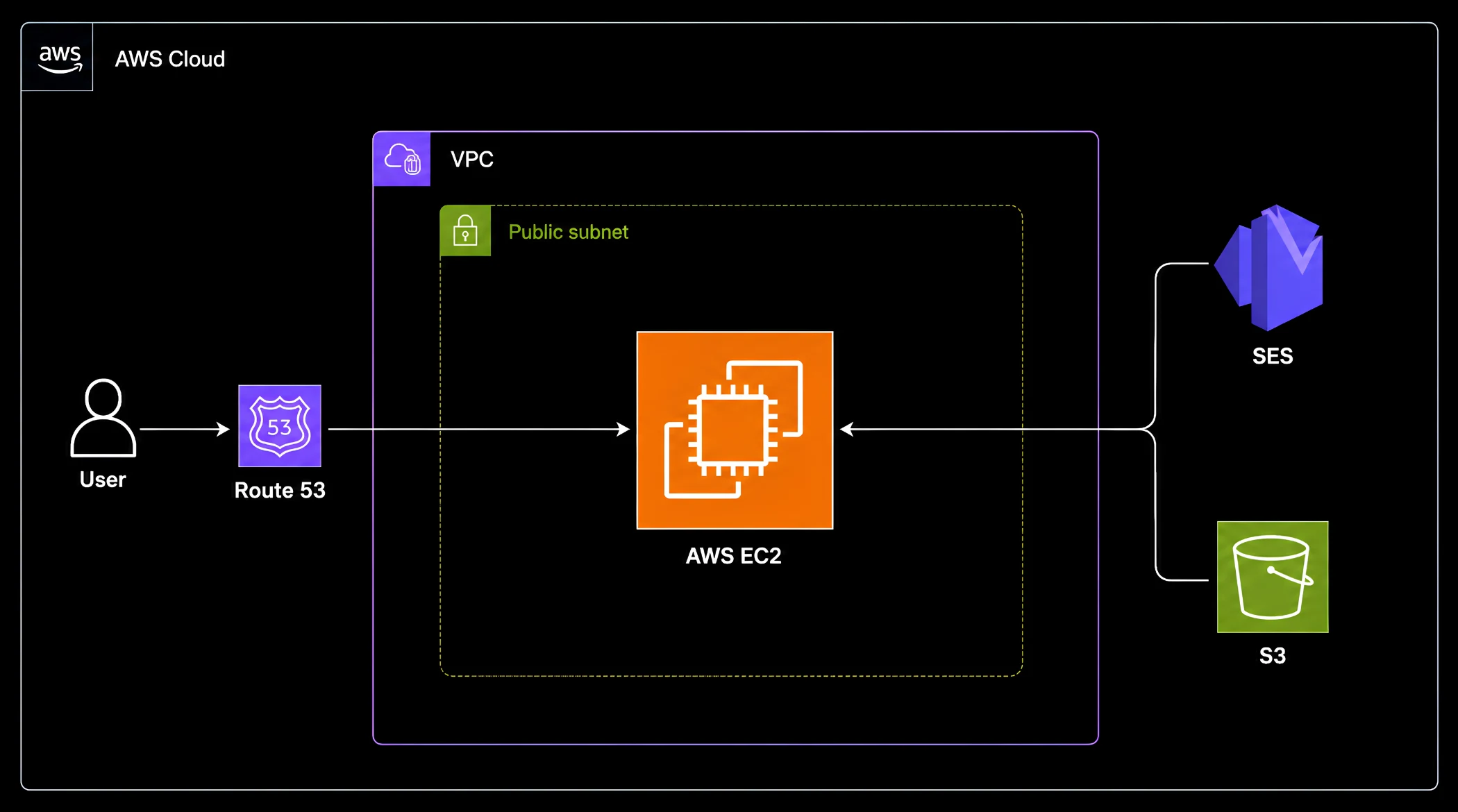
A basic AWS architecture built around a single EC2 instance covers the essentials: compute, S3 for storage, Route 53 for DNS, and SES for email. For early-stage products and development environments, this setup is genuinely appropriate. It is low operational overhead and quick to spin up. The problem is structural. A single EC2 instance is a single point of failure in the most literal sense. If the instance goes down, the entire platform goes with it. There is no Application Load Balancer distributing traffic, no Auto Scaling Group to handle sudden spikes from a seasonal campaign, and no managed database with automated backup and point-in-time recovery. Without AWS Cognito, authentication is managed manually, adding security overhead with every developer who touches the codebase. Without AWS CloudWatch monitoring and alerting, an incident is discovered by a user, not a dashboard.
AWS vs DigitalOcean: What the Evaluation Actually Looked Like
During the architecture evaluation for this reservation and loyalty platform, the client compared AWS and DigitalOcean directly. This comparison is common at exactly this transition point. DigitalOcean offers predictable flat pricing, a simpler interface, and a shorter learning curve. A Droplet-based setup with Spaces object storage and managed DNS came in at $88 to $101 per month, comparable to the AWS Tier 1 baseline. For a small team or an MVP, that clarity has genuine value.
The tradeoff is ecosystem depth. AWS offers RDS as a fully managed database with automated snapshots, an Application Load Balancer, Auto Scaling Groups for handling AWS auto scaling during seasonal traffic peaks, AWS Cognito replacing manual authentication, Secrets Manager for credential security, and CloudWatch for real-time monitoring and alerting, all as native services integrated into a single control plane. For a reservation platform where booking volumes can double overnight during a promotional campaign, and a loyalty app where user trust depends on consistent availability, those managed services represent avoided engineering work and reduced operational risk, not just convenience. The team chose AWS.
What Moving to a Resilient Setup Changed for This Platform
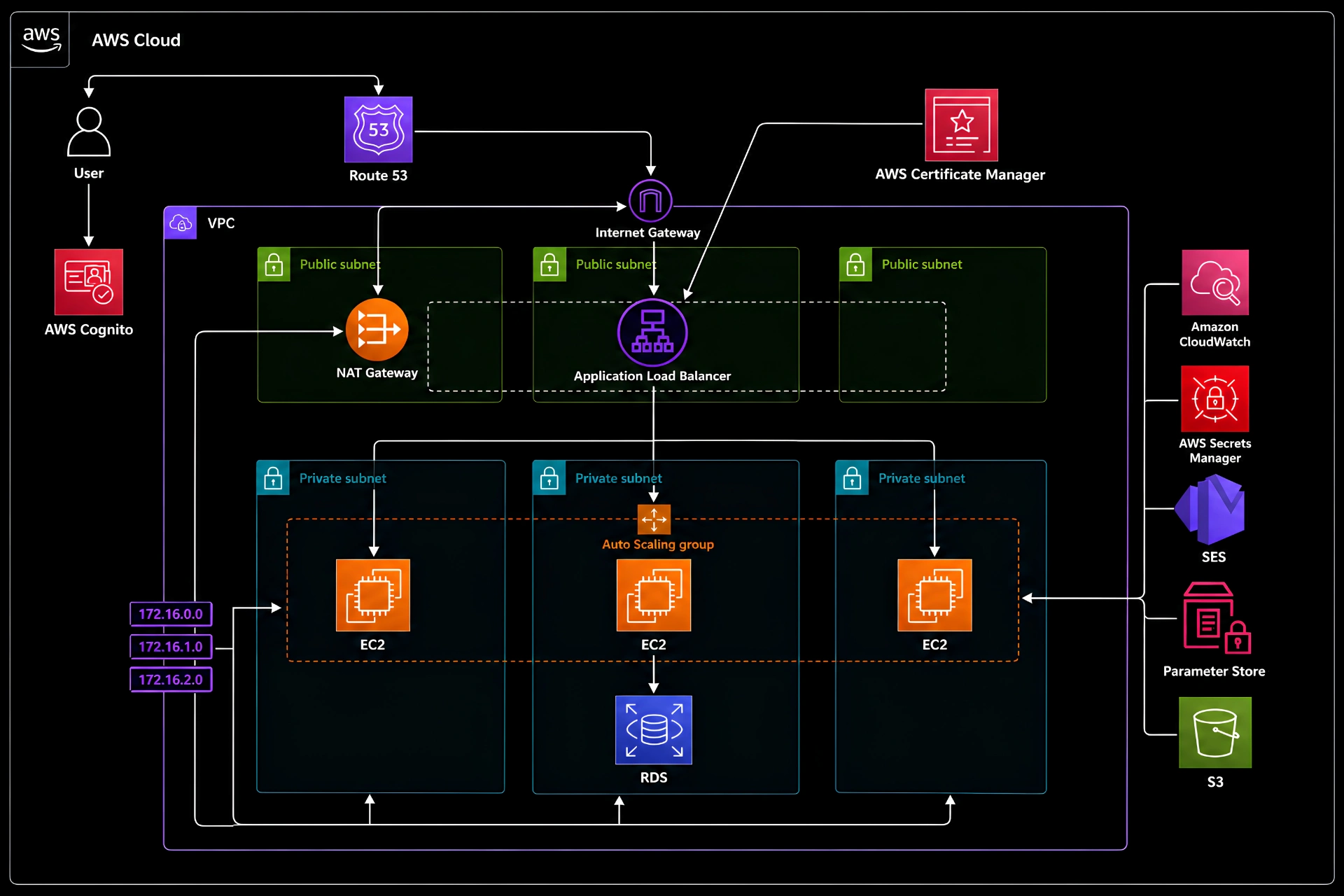
The medium-level AWS architecture Seaflux designed replaced every single point of failure in the Tier 1 setup. A single EC2 became an Auto Scaling Group behind an Application Load Balancer, absorbing booking spikes without manual intervention. The on-instance PostgreSQL database migrated to Amazon RDS, providing automated backups and point-in-time recovery without anyone patching a database server at midnight. AWS Cognito replaced manual authentication, eliminating a maintenance liability that had grown quietly with the codebase. Credentials moved to Secrets Manager. Monitoring and alerting moved to CloudWatch. The result was a production-grade AWS infrastructure with a fundamentally different risk profile. Monthly cost moved from $85 to $190, an increase of $105 per month to eliminate every single point of failure and give the team the ability to ship features without a maintenance window.
The outcome was not a cost saving. It was zero downtime during peak season, and the ability to push features to production with confidence. For a reservation platform where availability translates directly to bookings, and a loyalty app development product where user trust is built on consistency, those are not soft metrics. They are business requirements that the previous architecture could not guarantee.
Four Signs Your AWS Infrastructure Is Ready to Break
The triggers that indicate a platform should move from basic to scalable web application development infrastructure on AWS are consistent across industries. Recognising them early is the difference between a planned migration and a reactive one.
What the Next Level of AWS Infrastructure Looks Like
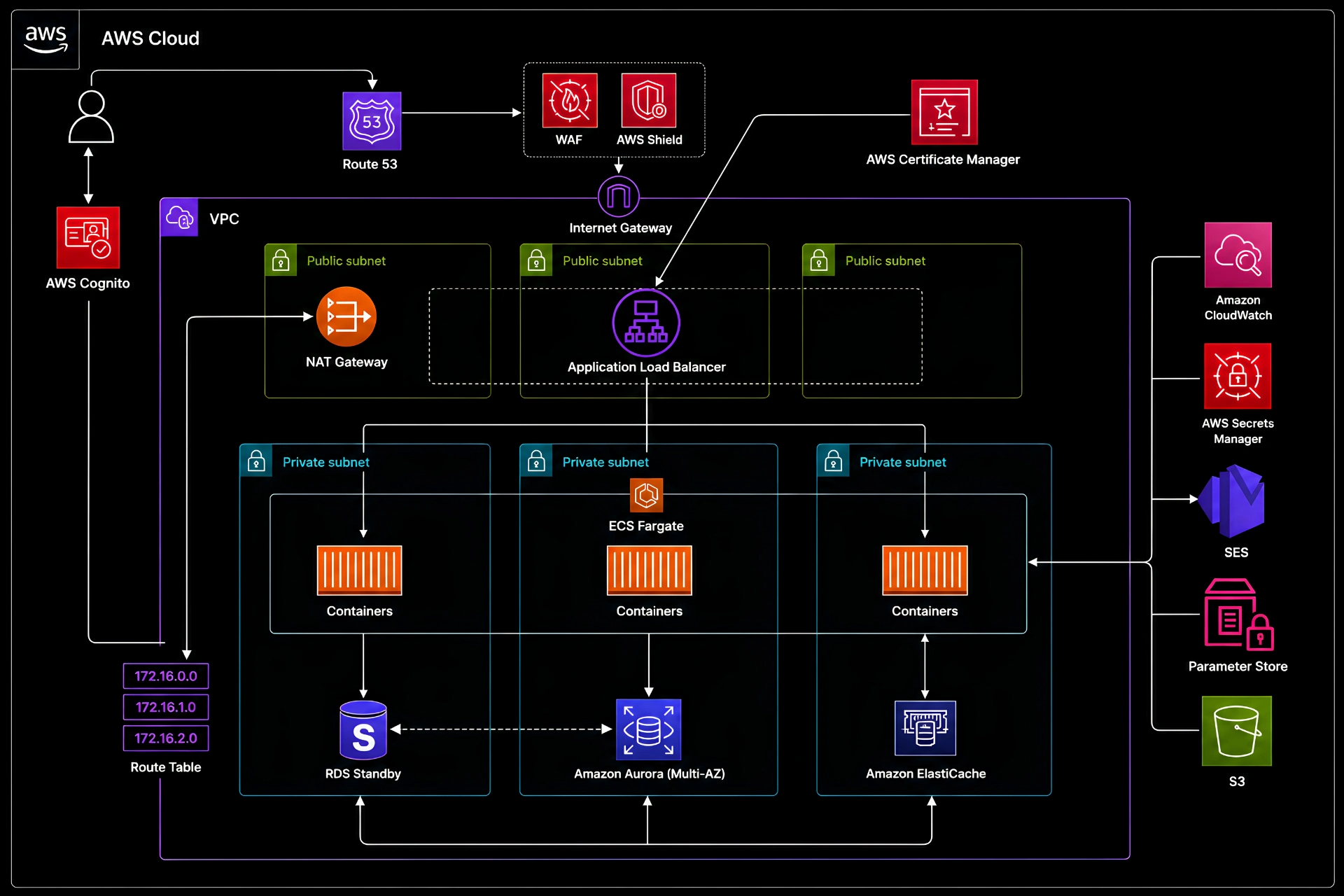
Seaflux also scoped a Tier 3 architecture for this client as a future reference point. This level introduces ECS Fargate for container orchestration without EC2 management overhead, Aurora Multi-AZ with automatic failover for a high availability cloud architecture with zero database downtime, WAF protection against DDoS attacks and SQL injection, and ElastiCache to reduce database load and improve response times. Monthly costs run between $390 and $450, but with the lowest RTO and RPO for AWS disaster recovery of all three tiers. Most platforms do not need Tier 3 the moment they outgrow Tier 1. But designing with it in mind from Tier 2 avoids expensive architectural rework later. Our Cloud infrastructure design services and cloud migration services help map that path before it becomes urgent.
The lesson this engagement reinforces is straightforward. Tier 1 is appropriate at the right stage. The mistake is treating it as permanent when the product has moved past that stage. Choosing the right AWS infrastructure tiers early, understanding the RDS versus PostgreSQL on EC2 tradeoff, evaluating AWS versus DigitalOcean for a production app based on ecosystem depth rather than sticker price, and designing for seasonal traffic and deployment confidence are decisions that belong in architecture reviews, not post-incident retrospectives. If your reservation platform or loyalty app is running on a single server and every deployment carries risk, that tension is the signal. Read more about cloud cost optimisation and choosing the right cloud database as part of your planning.
Frequently Asked Questions (FAQ): Get the Answers You Need
What is the difference between AWS Tier 1, Tier 2, and Tier 3 infrastructure?
Tier 1 is a single EC2 instance with everything on one server. It is fast to set up and low cost but has no redundancy. Tier 2 introduces an Auto Scaling Group, Application Load Balancer, managed RDS, Cognito authentication, Secrets Manager, and CloudWatch. Tier 3 adds ECS Fargate, Aurora Multi-AZ, WAF, and ElastiCache for enterprise-grade resilience and the lowest RTO and RPO targets. The right tier depends on your traffic patterns, team size, and acceptable downtime risk.
When should a CTO consider upgrading from basic to production-grade AWS infrastructure?
The clearest signals are deployment anxiety (teams avoid releasing without a maintenance window), database exposure (no automated backup or managed recovery), unpredictable traffic from seasonal demand or campaigns, and team growth that makes manual processes a bottleneck. Any one of these is a prompt to evaluate. All four together means the upgrade is overdue.
AWS vs DigitalOcean: which is better for a reservation or loyalty platform?
DigitalOcean offers simpler pricing and a lower learning curve, which suits early MVPs and small teams. For a reservation platform or loyalty app development product expecting growth, AWS provides deeper managed services including RDS, Cognito, Secrets Manager, Auto Scaling, and CloudWatch, which reduce operational burden as the platform scales. The cost gap between the two narrows quickly once you account for the engineering time saved by AWS-managed services.
What is the cost difference between AWS Tier 1 and Tier 2?
A basic single-server AWS setup runs approximately $75 to $95 per month. A medium Tier 2 architecture with ALB, Auto Scaling, RDS, Cognito, Secrets Manager, and CloudWatch runs approximately $170 to $210 per month. The difference, around $100 to $115 per month, eliminates every major single point of failure in the platform and enables zero-downtime deployments.
What does RTO and RPO mean for AWS disaster recovery?
Recovery Time Objective (RTO) is how long your platform can be offline before business impact becomes unacceptable. Recovery Point Objective (RPO) is how much data loss is acceptable. Tier 1 architectures have high RTO and RPO because recovery is manual and slow. Tier 2 reduces both significantly through managed RDS backups and multi-instance compute. Tier 3 with Aurora Multi-AZ targets near-zero RTO and RPO through automatic failover.
How long does migrating from Tier 1 to Tier 2 on AWS typically take?
For a reservation and loyalty platform of moderate complexity, a Tier 1 to Tier 2 migration can typically be completed in four to eight weeks, including RDS migration, Cognito integration, ALB and Auto Scaling configuration, CloudWatch setup, and cutover planning. The timeline depends on the size of the codebase, the number of integrations, and how much of the migration can be done in parallel with active development. Seaflux has executed migrations of this type with zero planned downtime during the cutover window.

Krunal Bhimani
Business Development Executive