seaflux logo

Flowise AI : Build Powerful AI Agents Visually Without Coding

Flowise AI - Build Powerful AI Agents Visually Without Coding

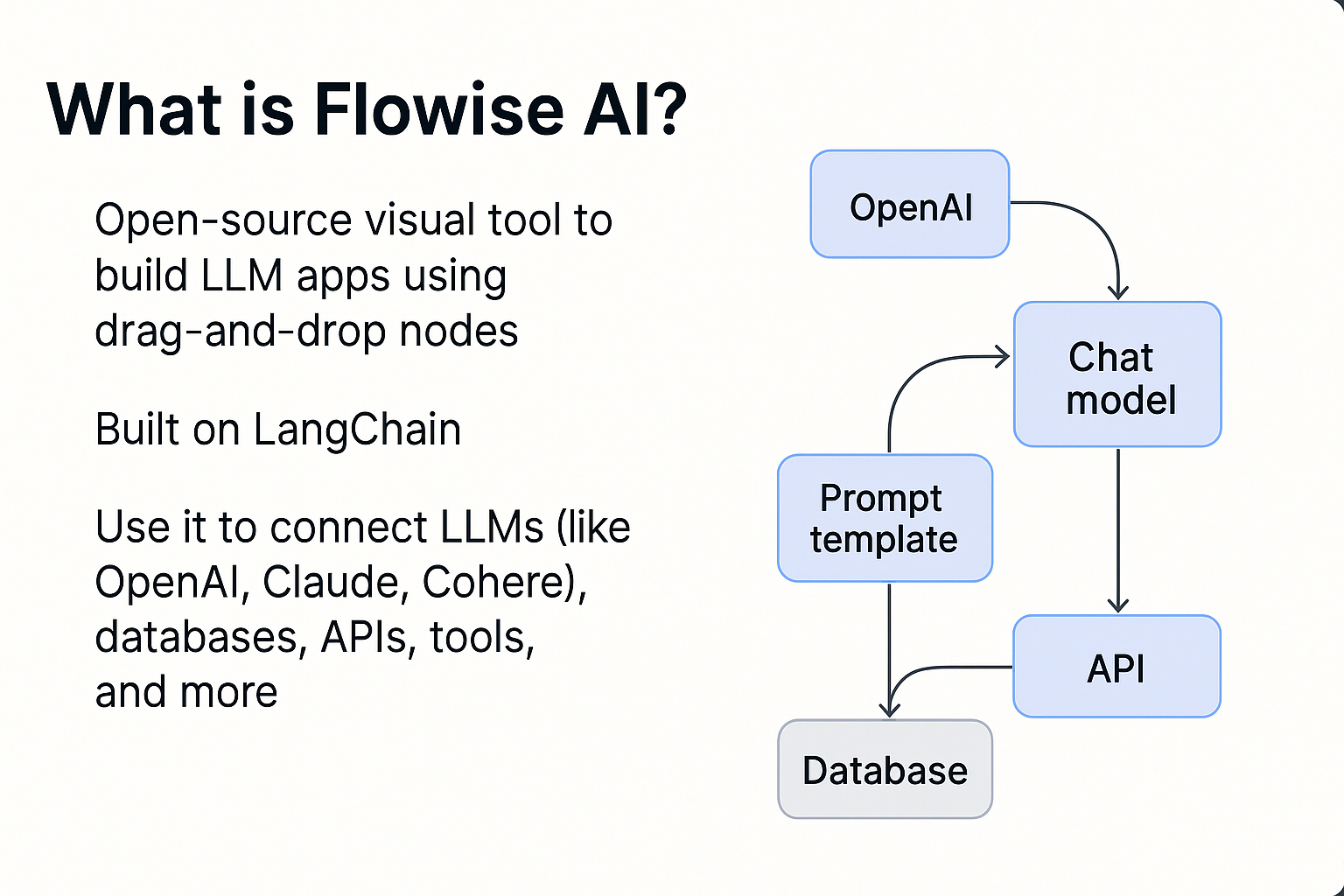
What is Flowise AI?

Flowise AI has made it easier than ever before to create AI applications with its open-source platform. The architecture of the Flowise platform is based on LangChain architecture and is designed for both developers and end-users. Instead of having to write complex custom code, users can create their AI applications by visually dragging and dropping block interfaces that represent language model data sources and tools in a manner similar to that used in flowcharting software. This allows users of all skill levels to create powerful AI agents much quicker and easier than previous methods.
Key Features


  • Drag and Drop Visual Builder - Design AI workflows with a visual interface, eliminating the need for lengthy code blocks, for faster and more intuitive development.
  • Supports building full AI agents that can reason, act, and respond across complex tasks.
  • Accelerate development with ready-made flows for common tasks like RAG (Retrieval-Augmented Generation), conversational assistants, and document processing. 
  • Connect to APIs, databases, vector stores, and external tools and extend with custom components and scripts.
  • You can self-host Flowise or run it locally, keeping full control over your data and environment.


Benefits


  • No/Low-Code Development: Ideal for non-technical users and rapid prototyping
  • Visual Clarity: Easier to visualize AI logic compared to text-only coding.
  • Flexible & Extensible: Works with many models, plugins, and data sources.
  • Open-Source Freedom: No vendor lock-in; customizable and community-driven. 
  • Quicker Deployment: From idea to deployment in minutes, not weeks.


Practical use cases


  • AI Chatbots & Virtual Assistants: Build conversational agents that answer user queries, support customers, or automate help desks.
  • Document-Based Q&A Tools: Create systems that can read documents (PDF/CSV) and answer questions from them, useful for research, education, or knowledge bases.
  • RAG Apps & Search Assistants: Combine large language models with database/vector search to build smarter search engines and recommendation tools.
  • Custom AI Assistants for Business: Deploy industry-specific assistants (sales support, analytics aids, SQL assistants, etc.) with minimal engineering overhead.


Comparison with other similar tools


ToolStrengthsPrimary Use
Flowise AIVisual, open-source, powerful LLM workflowsBuilding full AI agents & flows
LangflowSimpler, LangChain visualizerQuick prototyping with LangChain
n8nStrong automation integrationsBusiness task automations
VoiceflowDesigned for voice & conversational UXVoice & chatbot experiences


Limitations & Considerations

  • Learning Curve: Understanding nodes and flows takes a bit of getting used to.
  • Documentation Gaps: Users sometimes find missing or sparse docs for advanced features.
  • Local Resources: Self-hosting may require environment setup (Node, Docker).
  • Scaling: For production, deployments and monitoring must be carefully architected. (docs recommend env setup)


How to activate the tool

Flowise AI is flexible in how you can access and run it. Depending on your use case, learning, development, or production, you can choose between the official website, local self-hosting, or cloud deployment.


  1. Access via Official Website :
  2. Self-Host or Local Setup (Most Common & Recommended):
    • Self-hosting Flowise locally is the fastest and most popular way to start building AI workflows.
    • Prerequisites: npm installed, Node.js v18 or later
    • Open your terminal and install Flowise globally: npm install -g flowise
    • Start Flowise: flowise start
    • Open your browser and navigate to: http://localhost:3000. You will be greeted with the Flowise dashboard, where you can start creating chatflows and AI agents.


  3. Self-Host or Local Setup: Run from GitHub Repository (Advanced Users)
    • This method is suitable for advanced users who want deeper customization or plan to contribute to the project.
    • Clone the repository: git clone https://github.com/FlowiseAI/Flowise.git
    • Navigate to the project directory: cd Flowise
    • Install dependencies: npm install
    • Build the project: npm run build
    • Start the application: npm start
    • Access Flowise at: http://localhost:3000


  4. Cloud Deployment (For Production Use)
    • Flowise can be deployed on any cloud platform that supports Node.js or Docker, making it suitable for production-grade applications.
    • Choose a VM or container service
    • Install Docker or Node.js
    • Run Flowise using Docker or npm
    • Configure environment variables (API keys, DB, vector stores)
    • Expose port 3000 via firewall or reverse proxy (Nginx)


Basic Tutorial | First Project Idea


  • Build a Simple Q&A Assistant Using Flowise AI


  1. Setup
    •  Install Flowise locally via npm or Docker.


  2. Create a New Flow
    • Add a Start node.


  3. Add an LLM Node
    • Choose your language model (OpenAI, local LLM, etc.) 
    • Drag and drop an LLM node onto the canvas.


  4. Add a Document Loader
    • The Document Loader allows Flowise to read your data files to upload your dataset (PDF / CSV).


  5. Add Text Splitter & Vector Store (Optional but Recommended)
    • For better results with large documents, add a Text Splitter node, which splits large documents into smaller chunks.
    • Add a Vector Store (e.g., in-memory, Pinecone, etc.) Enables semantic search


  6. Connect the Nodes
    • Now wire everything together visually
    • Document Loader → Text Splitter → Vector Store → LLM → Output


  7. Test & Deploy
    • Run, test input, and refine responses.


This simple “Q&A agent” familiarises you with Flowise’s drag-and-drop workflow.


Links to Documentation & Resources


Smart AI & Software Solutions for Modern Businesses

As a custom software development company, we at Seaflux build scalable digital products that solve real business challenges. Our expertise spans custom AI solutions that automate tasks and improve decision-making, and chatbot development that enhances user engagement across platforms.

Looking for something more specific? We also provide custom chatbot solutions tailored to your business needs. As a trusted AI solutions provider, we deliver innovation from idea to implementation

Schedule a meeting with us to explore how we can bring your vision to life.

Virag Ranipa

Virag Ranipa

Software Engineer

Claim Your No-Cost Consultation!