AWS Lambda Pricing and Function Costs for Effective Cloud Cost Optimization
AWS Lambda is a serverless computing service that lets developers run code without worrying about provisioning or managing servers. It scales automatically, runs in response to specific events or triggers, and charges only for the resources used. This makes it a strong choice for cloud cost optimization, as you’re only paying for what you need rather than maintaining idle infrastructure.
By eliminating the overhead of server management, developers can focus on improving application functionality instead of handling operations. For organizations aiming for cloud cost reduction and effective cloud cost management, AWS Lambda’s pay-as-you-go model is an effective way to reduce cloud computing expenses while still ensuring performance and scalability remain intact. This approach is a core component of AWS cost optimization strategies that help businesses get the most value from their cloud spend and align with broader AWS optimization goals, often supported by specialized AWS optimization services. Understanding serverless pricing models like Lambda and the details of AWS Lambda billing and AWS Lambda function pricing is essential to making the most of these strategies.
If you want a hands-on guide to deploying an Express application with AWS Lambda, check out this blog: Deploy Express JS App To AWS Lamba Using The Serverless Framework.
In this article, we’ll cover:
- What AWS Lambda is and how it’s billed
- Its pricing structure and different billing models, including AWS Lambda function pricing
- A comparison of Lambda billing with other AWS services
- Best practices to optimize AWS costs and improve cloud cost management
- A real-world example of hosting a serverless website with zero infrastructure costs
What is AWS Lambda Billing?
AWS Lambda billing is based on the actual compute resources your functions consume. You pay for:
- Number of requests – Every time your function is invoked.
- Execution duration – The total time your code runs, measured in milliseconds.
Additionally, AWS charges for data transfers in and out of your Lambda function, including:
- Transfers over the internet
- Transfers between AWS services
- Additional charges if using services like Amazon S3, Amazon DynamoDB, or API Gateway with Lambda.
AWS Lambda Pricing Structure
Lambda pricing is simple but flexible, with charges split between duration-based billing and request-based billing. Understanding AWS Lambda pricing is essential for managing your cloud expenses effectively.
Using a lambda cost calculator can also help you estimate your monthly expenses accurately based on your specific usage and configuration, making budgeting and cost management easier.
1. Duration-Based Billing
You’re charged for the memory allocated and the execution time.
Example:
- Memory: 256 MB
- Execution time: 3 seconds per request
- 0.75 GB-seconds per request (3 × 256 MB)
For 1 million requests/month:
0.75 GB-seconds × 1,000,000 = 750,000 GB-seconds
750,000 × $0.00001667 = $12.50
2. Request-Based Billing
Charges are based on the number of times your function is called.
Example:
10 million requests/month × $0.20 per 1M requests = $2.00
AWS Lambda Free Tier & Pricing Models
AWS Lambda offers multiple billing options depending on your workload, which can be aligned with AWS cost optimization strategies.
Free Tier
- 1M requests/month free
- 400,000 GB-seconds of compute/month (for 12 months)
- 5GB Amazon S3 storage included
Pay-Per-Request
- $0.20 per 1M requests
- Ideal for unpredictable workloads where you only pay when functions run.
Reserved Instances
- Commit to 1–3 years of specific compute capacity.
- Lower hourly rate for predictable, steady workloads.
- Starts at $0.00001667 per GB-second.
Spot Instances
- Bid for unused EC2 capacity at reduced rates.
- Best for workloads tolerant to interruptions.
- Pricing varies based on EC2 spot rates.
ARM (Graviton2) vs x86: Which Should You Choose?
AWS Lambda supports two processor architectures: the standard x86_64 and ARM-based Graviton2. This choice directly affects your bill.
Graviton2 (ARM) pricing runs roughly 20% cheaper per GB-second than x86, while often delivering equal or better performance for most workloads. For most modern applications, especially Node.js, Python, and Java functions, switching to ARM is a simple way to reduce costs without changing how your function behaves.
When to use ARM (Graviton2):
- Most general-purpose workloads (APIs, data processing, event-driven functions)
- When your runtime and dependencies support ARM (most modern packages do)
When to stick with x86:
- Legacy applications with dependencies that only support x86
- Specific libraries or binaries not yet compiled for ARM
Switching an existing function to Graviton2 typically just requires changing the architecture setting, no code changes needed for most standard runtimes.
Cold Starts Now Cost More: The 2025 Billing Change
A cold start happens when Lambda has to set up a new execution environment before running your code, common after periods of inactivity or during traffic spikes.
Important update: as of 2025, AWS now bills for the initialization (INIT) phase of a cold start. Previously, this setup time was largely free. Now it's a recurring cost, especially noticeable for runtimes with heavier startup overhead like Java or C#.
What this means for your bill:
- Functions that cold-start frequently (low, sporadic traffic) will see a small but real increase in cost
- Lighter runtimes (Node.js, Python) are less affected than heavier ones (Java, .NET)
- If cold starts are frequent and costly for your workload, Provisioned Concurrency (keeping functions warm) may offset this, though it comes with its own separate cost, worth comparing both before deciding
Choosing the Right Billing Model
Choosing a billing model for your Lambda function depends on your workload's specific needs and usage patterns. For startups and growing businesses, we’ve detailed practical approaches in Smart Cloud Cost Management and Scalable Solutions for Startups in 2025. Here are some factors to consider when choosing a billing model for effective AWS cloud cost management and broader AWS optimization:
Usage patterns:
Consider the expected usage patterns of your Lambda function. The pay-per-request model may be more cost-effective if you expect high usage volumes. If predictable and consistent usage patterns exist, reserved instances may be more cost-effective for cloud cost optimization.
Flexibility:
Consider the flexibility of your workload. If your workload can tolerate occasional interruptions, the spot instances model may be more cost-effective. If you need consistent performance, reserved instances may be a better option.
Budget:
Pay-per-request is a good option for workloads with unpredictable usage patterns and low budgets, while reserved instances are better for workloads with predictable usage and larger budgets, helping achieve cloud cost reduction goals.
Integration with other AWS services:
Think about the integration of your Lambda function with other AWS services. Based on the services you choose, you can use different pricing models or discounts. One pricing model that could be advantageous with regard to your Lambda function and AWS service integrations is the AWS Data Transfer pricing model.
For example, let's say your Lambda function works with AWS services that trigger data transfer fees. Consider Amazon S3, Amazon DynamoDB, or Amazon API Gateway. About these activities, use AWS Data Transfer pricing to reduce costs during optimization of AWS strategies. This is an important step! Firstly, it is helpful to remember that AWS has a free tier for Lambda usage. This means, if the workload you have fits under the use case with the Limits of the free tier, then you still might have access to other billing solutions that can meet your needs. Once again, watching your usage and having models even with a free tier are important when you want to avoid slow fees that could quickly add up. If your workload fits within the free tier limits, you can use cost management tools like AWS Budgets and Cost Explorer to monitor your usage and avoid unexpected charges.
Running significant Lambda workloads and paying too much? Seaflux's cloud engineers have cut AWS bills by 40-60% for clients. Free cost audit →
Best practices for managing Lambda costs:
Use a smaller memory allocation:
The execution time and cost of your function are completely dependent on the amount of memory you allocate to it. By taking a lower memory allocation, you will reduce the cost per request.
Reduce the duration of each request:
You can optimize your code to decrease the duration of each request. You will save execution time, and potentially reduce your total cost too!
Use reserved concurrency:
A reserved concurrency allows you to define the maximum simultaneous execution capacity for your function. By limiting concurrent requests, you can control costs.
Use the AWS Serverless Application Model (SAM):
The AWS Serverless Application Model (SAM) is a framework for building serverless applications. SAM includes capabilities to help you scale automatically, make cost optimization easier, and help you reduce Lambda-specific costs.
The Hidden Costs Beyond Lambda Compute
Lambda's own compute charges are often a small fraction of your real bill. Several supporting services can add up to far more than Lambda itself:
- API Gateway: charges per million requests, often the single largest add-on cost for API-based Lambda functions
- CloudWatch Logs: billed per GB of log data ingested, high-traffic or verbose logging can add up quickly
- Data transfer: sending data out of AWS (to external APIs, users, etc.) is billed separately from Lambda compute
- NAT Gateway (if your function runs inside a VPC): charged per GB processed, easy to overlook
In practice, these supporting services can make up 50-80% of a serverless workload's total cost, far more than the Lambda compute charges most teams focus on. When budgeting for Lambda, always account for these alongside the compute pricing above, not instead of it.
Comparing AWS Lambda with Other AWS Compute Services
| Service | Pricing Model | Scaling | Ideal For |
| AWS Lambda | Pay-per-use (requests + duration) | Automatic | Event-driven, short-lived workloads |
| EC2 | Hourly/second billing | Manual or auto | Persistent workloads |
| Elastic Beanstalk | Based on instances + storage | Manual/auto | Web apps with custom infrastructure needs |
Key Difference: Lambda is event-driven and scales instantly, while EC2 and Beanstalk require capacity planning, making Lambda ideal for AWS cloud cost optimization services.
How Seaflux Utilizes AWS Lambda Free Tier to Power Its Website :
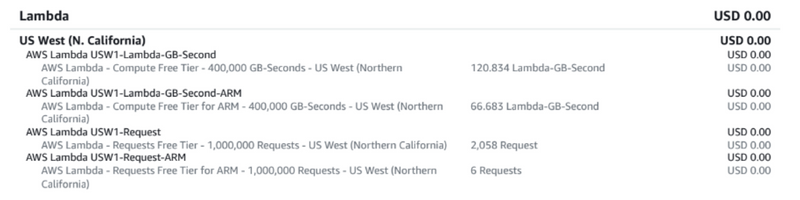
Seaflux has been utilizing AWS Lambda's free tier to power its website, built using Angular and Node.js. Using Lambda's serverless computing capabilities, Seaflux has built and deployed its website without any infrastructure costs. The free tier provides Seaflux the ability to receive 1 million requests, and can compute up to 400,000 GB-seconds per month without charge; this is plenty of capacity to cope with its current traffic situation. Additionally, since Lambda is an auto-scaling application, there is no risk of downtime or stutter in performance during traffic spikes. This is what we mean by cloud cost reduction while fully exploiting AWS cloud cost optimization capabilities.
End Note :
To effectively optimize serverless application costs & billing with AWS Lambda, it is helpful first to understand AWS Lambda billing and AWS Lambda pricing. Using tools like a lambda cost calculator can simplify the estimation process and help manage budgets more effectively. By understanding usage patterns, optimizing memory sizes, using pricing calculators & budget alerts, and following cost optimization best practices, a developer can do their part to optimize for best use and cost of their AWS Lambda applications. With the time and energy to begin the cost-optimization journey, a developer can rest assured that they can have the benefits of serverless computing without having the costs go beyond their functional requirements. For this reason, cost optimization requires the right combination of understanding, planning, and willingness to continually optimize on an ongoing basis to make sure that AWS Lambda stays a reasonable and cost-optimized solution aligned with broader AWS optimization strategies and the support of professional AWS optimization services!
We at Seaflux are your dedicated partners in the ever-evolving landscape of Cloud Computing. Whether you're contemplating a seamless cloud migration, exploring the possibilities of Kubernetes deployment, or harnessing the power of AWS serverless architecture, Seaflux is here to lead the way.
Have specific questions or ambitious projects in mind? Let's discuss! Schedule a meeting with us here, and let Seaflux be your trusted companion in unlocking the potential of cloud innovation. Your journey to a more agile and scalable future starts with us.
Frequently Asked Questions (FAQ): Get the Answers You Need
How much does AWS Lambda cost per request?
AWS Lambda charges $0.20 per 1 million requests, after the first 1 million requests each month, which are free under the AWS free tier.
Is AWS Lambda free tier really free forever?
The 1 million requests and 400,000 GB-seconds of compute are free every month on an ongoing basis, not just for 12 months. Some older AWS documentation lists it under the 12-month free tier, but Lambda's free tier is part of the "Always Free" tier and does not expire.
Does AWS Lambda charge for cold starts?
As of 2025, AWS bills for the initialization (INIT) phase of a cold start, which was previously free. This adds a small but real cost increase, especially for runtimes with heavier startup overhead like Java or C#.
Is ARM (Graviton2) cheaper than x86 for Lambda?
Yes, Graviton2 pricing runs roughly 20% cheaper per GB-second than x86, while often matching or exceeding x86 performance for most modern workloads like Node.js and Python.
What costs more than Lambda itself in a typical serverless setup?
Supporting services like API Gateway, CloudWatch Logs, data transfer, and NAT Gateway (if running inside a VPC) often make up 50-80% of a serverless workload's total cost, more than Lambda's own compute charges.

Jay Mehta
Director of Engineering